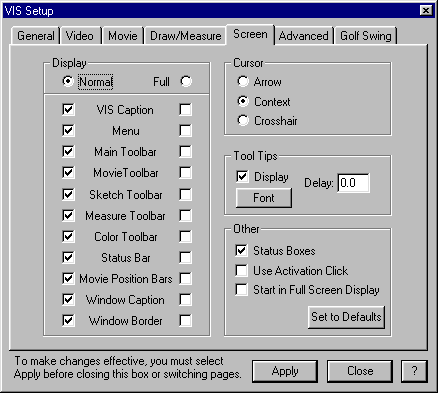
Controls settings that affect the display of the screen.
The Display section of the VIS Setup/Screen dialog box determine the toolbars and menus that show when VIS is either Normal or Full Screen mode. The F12 key toggles between Normal and Full Screen mode.
It is recommended that all toolbars be on in Normal mode and minimal toolbars (perhaps only the movie position bars) be turned in Full Screen mode to limit distraction.
The Cursor section of the VIS Setup/Screen dialog box determines the type of cursor in VIS.
An Arrow cursor provides an arrow for selecting all of the time, regardless of the mode.
A Context cursor shows the mode and the type of selection by the symbol of the cursor.
A Crosshair cursor provides an arrow for selecting all of the time, regardless of the mode.
Tool Tips, when checked, provided labels for the toolbar icons. These labels appear when the cursor is placed over an icon. The Font button selects the font size and type for the toolbar icon labels.
Status boxes, when checked, ….????.
Use Activation Click, when checked, …???
Start in Full Screen Display, when checked, will start …I suspect that unchecked, VIS will start in Normal regardless of how it shuts down I suggest we recommend leaving this unchecked in case of problems getting back to a Normal screen???