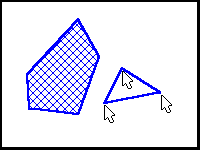
Polygon allows you to draw a multi-sided object by selecting multiple points. To draw a polygon, select the points that define the sides with the left mouse button. When you have finished outlining your object, click with the right mouse button to finish the object.
The object is hatched if Solid Fill is enabled in the Setup/Draw menu. If the hatching is drawn but not desired, click the right mouse button (undo) to remove it.