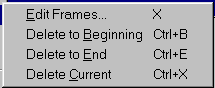
The Movie/Edit menu provides functions that are used to edit movies.
Will….check this out closely
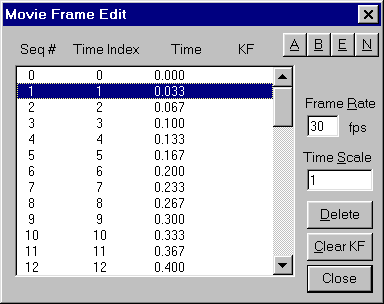
The Movie Frame Edit dialog box allows you to change the displayed frame rate of your movie and make edits on a more global scale.
Movie Frame Edit Dialog Box
The A-B-E-N buttons select groups of frames. To use these buttons to select groups of frames, select the frame of interest by clicking on it with the left mouse button. The A button selects alternate frames to easily allow you to remove every other frame. The B button selects from the highlighted frame to the beginning, the E button selects from the highlighted frame to the end, and the N button selects all frames.
Frames are renumbered after deleting.
The Frame Rate box allows you to enter a playing speed of frames per second.
The Time Scale box allows you to
The Clear KF button deletes all Key frames.
Delete to Beginning deletes the frames from the beginning of the movie to the frame that the cursor is on. The movie frames are renumbered with the first frame becoming frame 1. ???
Delete to End deletes frames from the cursor to the end of the movie.
Delete Current deletes the current movie frame. Will, are the remaining frames renumbered???