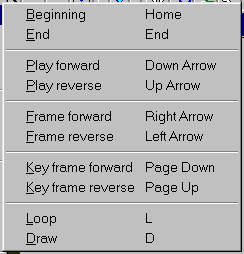
The Movie/Play menu provides movie playing controls. You dont typically select options from this menu - use either the Movie Toolbar, mouse, or the keyboard.
Returns you to the beginning of the movie.
Takes you to the last frame of the movie.
Play forward (Down Arrow)
Plays the movie backward (in reverse).
Frame forward (Right Arrow)
Moves the movie one frame forward.
Frame reverse (Left Arrow)
Moves the movie one frame backward (reverse)
Key frame forward (Page Down)
Jumps forward to the next key frame.
Key frame reverse (Page Up)
Jumps backward to the next previous key frame.
Loops the movie in continuous play mode. The movie can be set to play continuously from front to end or from front to end and then end to front under VIS Setup/Movie. A pause between loops can also be set in this dialog box.