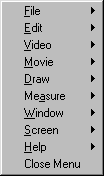
The main menu of VIS appears across the top of the screen (if enabled via Screen Setup) In addition, the same set of menu choices can be displayed as a floating, popup menu by pressing the F9 key. The menu choices allow complete functionality, which means you can get to every VIS function from one of these menu picks.
The main menu choices can be selected by either clicking on them with the left mouse button or by pressing the Alt key and then underlined letter in the menu choice. For example, to select Draw from the keyboard, press the Alt key and then press then D key. Note that the letter is not always the first letter of the word. For instance, to select the Measure menu from the keyboard, use Alt-A.