previous
next
contents
index
VIS Screen
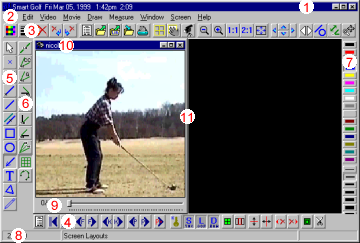
The VIS screen, if all options are enabled, will appear as shown below. Control over the display of the various components of the VIS screen is via Edit/Setup/Screen.
Example of VIS Screen
1.
VIS Caption
2.
Menu
3.
Main Toolbar
4.
Movie Toolbar
5.
Draw Toolbar
6.
Measure Toolbar
7.
Color/Width Toolbar
8.
Status Bar
9.
Movie Position Bar
10.
Window Caption
11.
Window Border