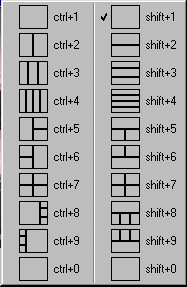
This menu allows selection of screen layout - the number of viewports and their arrangement on the screen. It is accessed via the menu or the F11 shortcut key. In addition, shortcut keys are provided to directly access individual layouts as follows.
•
Selecting a numeric shortcut key will select a side-by-side screen layout. For instance the pressing 2 will display 2 viewports side-by-side.
•
Selecting a numeric shortcut key with Shift or Ctrl pressed will select a vertically oriented screen layout. For instance, Shift+2 will display 2 viewports one over the other.
The provided screen layouts should be sufficient for most uses of VIS. However, advanced users may customize the screen layouts by editing the INI file with assistance from CIS technical support.