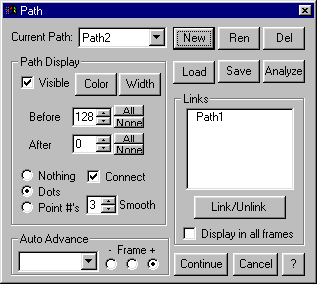
Each path must have a name. This first time a path is setup on a movie, a dialog box prompts for this name. If a second path is used, for instance when one path is a golfers backswing and the second is the downswing, the second path must be setup and given a name.

Path - creating a simple path
Path - creating several paths with different colors
Path - creating and linking two paths
All movie paths are listed in the Current Path box. New opens up a new path, Ren renames the selected path, and Del deletes the selected path.
Will, what do the Load and Save buttons do?
Will, I think we should have several example bitmaps here.
The Path Display section of the Path dialog box controls whether or not the path is visible and its color and line width.
The Before and after boxes determine the number of points that are visible in the path trace before and after the point in the current frame. This feature allows examination of current frame and visualizing both the preceding and succeeding motion path.
The Nothing, Dots, and Point # determine whether the indicated point shows in the trace. The point that establishes the trace can be displayed with a number, a dot, or no point indication.
Connect will connect the dots with a line to form a trace.
Smooth determines the level of automatic smoothing between dots. Smoothing can make a rough trace (due to large increments between points) appear smooth by calculating a best fit line through the points.
The Links section of the Path dialog box allows two paths to be hooked together and displayed simultaneously with each paths trace and lines joining the two paths.
To join two paths, select the first one in the Current Path box. Then select the second one in the links path listing and press the Link/Unlink button. You can unlink two paths by toggling the Link/Unlink button.
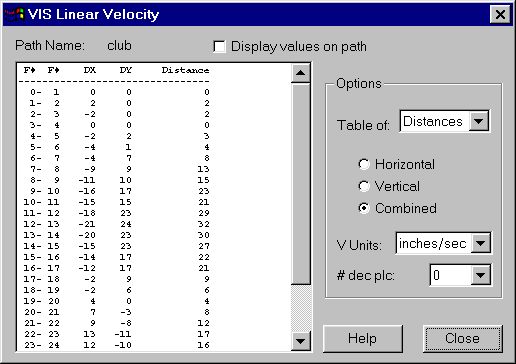
Analyze will show the x and y positions of each point on the trace. Under the Options section, Table of: shows either point positions, distance in x and Y and total between consecutive points, and velocity based on the distance measurement and frame rate.