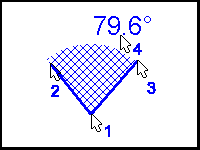
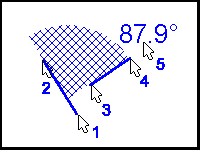
VIS allows calculation of the angle between any two lines in space. All angle calculations are made the same way, but the input methods change for user friendliness. All calculations are based on four points defining two lines and a direction from the first line to the second line. The direction follows the right hand rule with positive being from X to Y. NOTE that in VIS, positive X points from left to right on the screen and positive Y points from the top to bottom of the screen.
The calculation of an angle is always made by first determining the common point for the two lines. In many cases this center many lie off of the screen. After the center is found, the starting points for the two lines becomes this center. Then with the center point as the beginning of both lines and the existing second point for both lines, the calculation is made in the reference direction with the angle always being taken from line 1 to line 2.
The activity file angle data is structured for four mouse picks with pick 1 being the starting point of line 1, pick 2 being the ending point of line 1, pick 3 being the starting point of line 2, and pick 4 being the ending point of line 2
The types of angles currently implemented in VIS are:
In type 1, line 1 is the reference line given in the datum line entry for the angle, and line two is selected by the user. The menu prompts only for the line 2 mouse picks. The angle is taken from the reference line to the user selected line. In type 3, line 1 is selected by the user. Pick 3 is set equal to pick 1 to establish a common center and the user inputs pick 4. For type 4, all mouse picks are user generated and establish two independent lines in space.
A common center angle measures the angle between two lines having a common center. For instance, to measure the angle between your upper arm and forearm, the elbow is a common center for a line extending along your forearm to a line extending along your upper arm.
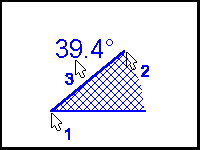
Relative angles are similar to common center angles with the exception that the first line (the reference line) is fixed to be either horizontal or vertical. The second mouse pick determines the location of the angle relative to the reference line. The example below shows the Horizontal Right relative angle.