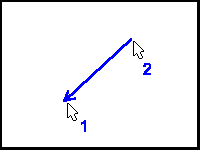
Arrow creates a line with an arrowhead at the end of it. The arrowhead is at the first end of the line. To create arrows, click with the left mouse button on the object of interest, move the mouse to the other end of the line and click a second time with the left mouse button. SHIFT and CTRL modifiers work as they do for simple lines.
Arrowhead height and width size is via Edit/Setup | DrawMeasure dialog box.